What is a Dead Pixel on a Monitor? Diagnostic Blueprint
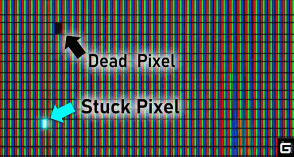
Understanding exactly what is a dead pixel on a monitor separates the hardcore hardware enthusiast from the casual consumer. A dead pixel refers to a pixel on a digital display that does not light up and appears as a constant black spot.
Most buyers unbox a new premium display, spot a microscopic dark speck, and immediately assume the worst. Wrong. The reality of display anomalies is rooted in complex semiconductor physics, optical refraction, and microscopic manufacturing variances that dictate the yield of modern fabrication plants. This diagnostic blueprint strips away the generic troubleshooting advice dominating the search engine results to expose the absolute truth about Thin-Film Transistor (TFT) failure, subpixel geometry, and panel diagnostics. The empirical evidence is clear: identifying, isolating, and resolving a defective pixel requires a clinical understanding of how modern active-matrix panels operate under extreme electrical stress.
What is a dead pixel? The Core Mechanisms of TFT Failure
A dead pixel represents a catastrophic, irreversible failure of the transistor logic governing a specific coordinate on a display matrix. In modern digital liquid crystal displays (LCDs) and Organic Light-Emitting Diode (OLED) screens, every single subpixel is driven by a distinct Thin-Film Transistor (TFT).
These microscopic transistors act as voltage gates, regulating the exact electrical current applied to the liquid crystal layer or the organic emissive compound. When voltage is actively applied in a standard Normally Black (NB) panel architecture, the liquid crystals untwist, altering the polarization of the backlight passing through the RGB layer and color filters.
The Physics of the “Dead” State
When a pixel is “dead,” it has permanently lost electrical power due to a fault in the pixel’s controlling transistor or its RGB sub-pixels. The underlying hydrogenated amorphous silicon (a-Si:H) or Low-Temperature Polycrystalline Silicon (LTPS) TFT has suffered a terminal physical or electrical breakdown, dropping the subpixel voltage to absolute zero.
With zero voltage, the liquid crystals remain in a closed, untwisted state, completely blocking the backlight. The result is a permanent, lightless void on the screen.
Semiconductor Degradation and Impurities
The root cause of this failure invariably traces back to physical degradation within the semiconductor substrate. Threshold Voltage (Vt) instability is a primary culprit. Over time, or due to microscopic manufacturing impurities introduced in the cleanroom, the threshold voltage required to activate the a-Si:H TFT degrades.
When the voltage requirement shifts beyond the operational parameters of the driver Integrated Circuit (IC), the transistor permanently fails to open. Furthermore, a-Si:H TFTs are extraordinarily sensitive to light-induced leakage currents. High-intensity backlights (such as modern Mini-LED arrays pushing 1000+ nits) can cause photoelectric leakage, stressing the transistor until the gate oxide layer physically ruptures.
The Science / Research Insight: The failure of an a-Si:H TFT is often linked to threshold voltage degradation under severe bias-temperature stress. Experimental laboratory data indicate that the output current for associated emissive diodes can decrease by up to 28% in conventional 2-TFT pixel circuits due to this rapid degradation. When the threshold voltage shifts beyond the driver’s maximum output capability, the transistor permanently fails to open, resulting in a true dead pixel void.
What is a stuck pixel?
A stuck pixel represents the exact opposite of a dead pixel in terms of transistor logic. Instead of failing in the “closed” or unpowered state, the transistor suffers a micro-short circuit or an acute logic fault that locks it in an “open” or permanently energized state.
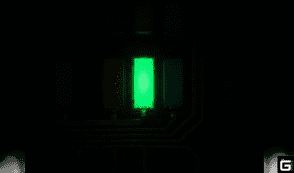
The liquid crystals within that specific subpixel are forced into a constant twist, allowing the backlight to bleed through continuously regardless of the image data being sent by the graphics card. Because this hardware fault usually affects only one of the dedicated red, green, or blue (RGB) subpixels within the larger pixel cluster, the visual result is a piercing, static dot of pure primary color.
What’s the difference between dead pixels and bright pixels?
Differentiating between a permanently unlit dead pixel, an overly lit bright pixel, and a stuck pixel requires understanding the specific subpixel states and display output behavior against highly contrasting backgrounds.
- Dead pixels manifest as solid black holes because all three subpixels (Red, Green, Blue) are completely devoid of voltage simultaneously.
- Bright pixels are glaringly obvious because all subpixels within the cluster are receiving maximum voltage, rendering a bright white dot.
- Stuck pixels isolate the failure to a single color channel.
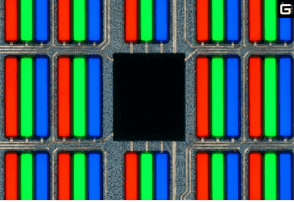
Calibration specialists utilizing high-powered macro lenses observe these defects not as blurry dots, but as highly defined, geometric rectangles corresponding exactly to the physical layout of the display matrix.
Comparison Table: Defect Classification
| Defect Type | Transistor State | Voltage Status | Visual Manifestation | Background Visibility |
| Dead Pixel | Failed Open (Severed connection) | 0V (Always Off) | Solid Black | Highly visible on White/Light backgrounds |
| Stuck Pixel | Failed Closed (Micro-short) | Constant V (Always On) | Pure Red, Green, or Blue | Highly visible on Dark/Black backgrounds |
| Bright Pixel | Failed Closed (All Subpixels shorted) | Max V (All On) | Pure White | Blindingly visible on Dark/Black backgrounds |
What is a Stuck Pixel vs a Dead Pixel, and How to Spot Them
Diagnostic precision is mandatory to accurately classify a display anomaly. Testing cannot be done casually on a chaotic desktop background. The diagnostic workflow requires testing conducted in a dark room mimicking virtual darkness, using pure, uncompressed solid color backgrounds to force the liquid crystal layer into extreme, verifiable states.
- To isolate a dead pixel: Flood the screen with pure white (#FFFFFF). A dead pixel will immediately stand out as a sharp, geometric black square absorbing the light.
- To isolate a stuck pixel: Flood the screen with pure black (#000000). A stuck pixel will pierce through the darkness as a bright red, green, or blue laser-like dot.
- To map subpixel failures: Systematically cycle through pure Red (#FF0000), Green (#00FF00), and Blue (#0000FF) full-screen fills.
Difference Between Stuck and Dead Pixel: What to Pay Attention
The diagnostic key lies exclusively in subpixel behavior under targeted voltage stress. A true dead pixel involves the simultaneous failure of all three (or four, in cutting-edge WRGB OLED panels) subpixels. This simultaneous failure is relatively rare as a spontaneous degradation event and usually indicates localized physical trauma to the TFT grid or a severed data line.
A stuck pixel, however, is almost always an isolated single subpixel failure. If a monitor displays a pure red test screen, and a single microscopic dot appears black, it means the red subpixel at that exact coordinate is dead, even if the green and blue subpixels function perfectly on other test screens.
Stuck vs Dead Pixels on New Screens: How to Recognize
When unboxing a premium $1,000+ display, a rigorous Quality Assurance (QA) protocol is mandatory to ensure the panel meets acceptable tolerances before the return window closes.
- Ambient Light Control: Completely dim all room lights to eliminate screen glare, reflections, and ambient color contamination.
- Thermal Display Warm-Up: Allow the monitor to run at 100% brightness for at least 30 minutes. Thermal expansion of the panel components can often reveal micro-shorts in the TFT array that remain invisible when the chassis is cold.
- The Black Level Test: Display a full-screen, uncompressed black image. Scan the panel systematically from top-left to bottom-right, hunting for bright white, red, green, or blue pinpricks.
- The Peak White Test: Switch to a full-screen pure white image. Scan the grid again, this time looking for microscopic black squares.
- Forensic Documentation: Immediately photograph any anomalies using a smartphone macro lens to definitively prove the defect is a structural pixel failure, not surface dirt or a screen protector bubble.
What do dead pixels look like on a monitor?
Against a brilliantly lit white background, a dead pixel looks like a microscopic, perfectly square black hole physically punched through the display matrix. It entirely lacks the soft, diffused, out-of-focus edges characteristic of trapped dust. Under a specialized macro lens, the precise geometry of the failed RGB subpixel cluster becomes blatantly apparent, revealing a stark, unilluminated rectangle sitting dead amidst a sea of intensely glowing phosphors.
What devices can dead pixels have?
The assumption that pixel defects are confined strictly to desktop PC monitors is fundamentally flawed. Any electronic device utilizing an active-matrix grid—whether it’s an LED Monitor, a standard LCD monitor, or other LCD displays—is highly susceptible to TFT failure. This encompasses smartphone OLEDs, premium televisions, VR headsets, handheld consoles, and even the digital TFT instrument clusters in modern motorcycles and vehicles.
Display Pixels vs. Camera Sensor Pixels
A critical engineering distinction must be drawn between display pixels (which reproduce photons) and camera sensor pixels (which capture photons).
- Dead Pixels on CMOS sensors: A specific silicon photosite is failing to register incoming light, resulting in a permanent black dot encoded into the raw data of every photograph.
- Hot Pixels on sensors: These are defective photosites leaking thermal current, resulting in a bright red or white dot in images, which is often resolved via a firmware-level sensor remapping algorithm.
Does screen size affect dead pixel visibility?
Screen size in isolation is a completely irrelevant metric; pixel-per-inch (PPI) density is the sole mathematical variable that dictates the human eye’s ability to perceive a dead pixel. The human visual system has a finite resolving power, typically cited around 1 arcminute of angular resolution.
- Low PPI Scenarios: On a standard 27-inch 1080p monitor (roughly 81 PPI), a single dead pixel is a massive 0.31mm void. From a standard 24-inch viewing distance, this void is glaringly obvious.
- High PPI Scenarios: Conversely, on a modern 27-inch 4K monitor (163 PPI) or a flagship smartphone display exceeding 400 PPI, the individual pixels are microscopically small.
At these extreme densities, a single dead pixel falls well below the visual threshold of the average human eye. The optical aliasing artifacts and subpixel blending at high PPIs effectively camouflage isolated dark dots, making them practically invisible without the aid of a jeweler’s loupe.
What’s the best way to check for dead pixels?
Relying on daily web browsing, video playback, or chaotic desktop wallpapers to spot pixel anomalies is a severely flawed methodology. Physical panel defects can be easily confused with GPU rendering artifacts, unrendered game textures, or the “dirty screen effect” (DSE) caused by poor backlight uniformity.
Tools and Methods: How to check monitor for dead pixels
Industry-standard testing protocols mandate the use of dedicated diagnostic software and uncompressed software tools, such as the EIZO Monitor Test or the web-based Black Screen Tool, to force direct hardware-level color rendering without the interference of OS color profiles or chroma subsampling compression.
- Purge the Canvas: Wipe the physical display panel down with a dry, high-gsm microfiber cloth. A microscopic speck of surface dust is the number one cause of false-positive dead pixel diagnoses.
- Bypass the OS Stack: Use a browser-based full-screen HTML5 testing tool to eliminate OS-level UI elements, taskbars, and cursor drop-shadows.
- The RGB Stress Cycle: Cycle the display through pure, 100% saturation Red, Green, and Blue screens. This systematically tests the individual voltage gates for every subpixel color channel.
- The Contrast Extremes: Toggle rapidly between pure Black and pure White, pushing the panel’s Contrast Ratio to its absolute limits. This forces maximum voltage swings across the entire TFT backplane, often exposing weak transistors that collapse under maximum electrical load.
- Proximity Scanning: Position the eyes roughly 10 to 15 centimeters from the panel. At standard distances, a dead subpixel on a 1440p or 4K display will escape casual detection.
Dust Behind Screen vs. Dead Pixel: The Parallax Test
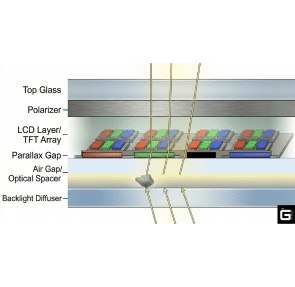
Diagnostic laboratories routinely encounter perfectly functional panels shipped back for RMA simply because the end-user misdiagnosed internal dust as a dead pixel. Dust, microscopic insects (like thunderbugs), and manufacturing debris can easily become trapped between the backlight diffuser sheets and the LCD matrix during assembly.
To definitively separate physical dust from a transistor-level dead pixel, execute the Parallax Test:
- Locate the Anomaly: Display a pure white background at maximum luminance and pinpoint the dark spot.
- Establish a Fixed Reference Point: Place a minuscule piece of painter’s tape or a dry-erase marker dot on the physical outer glass/anti-glare coating directly over the dark anomaly.
- Shift the Viewing Angle: Move the head significantly to the left, right, up, and down, altering the viewing angle by at least 45 degrees in all directions.
- Observe the Optical Shift: * If the dark spot remains perfectly anchored to the exact same spot relative to the surrounding illuminated pixel grid, it is a genuine dead pixel. It is physically etched into the LCD matrix.
- If the dark spot shifts, “floats,” or moves relative to the grid of pixels behind it, it is a physical contaminant trapped in a different layer of the monitor assembly. This optical displacement is the definition of parallax.
How do dead pixels affect gaming?
For competitive esports professionals operating on high-end TN or OLED panels at extreme refresh rates (240Hz, 360Hz, or beyond), absolute visual clarity is paramount. In fast-paced, high-stakes scenarios, the human visual cortex relies heavily on peripheral tracking and micro-motion detection.
A dead pixel violently disrupts the visual uniformity of the screen. Because the dead pixel is a completely static anomaly against a highly dynamic, rapidly shifting background, it forces the brain’s visual processing center to constantly evaluate a false positive for movement or a distant enemy target. This creates a jarring, localized visual disconnect that shatters immersion, ruins the visual experience, and measurably degrades reaction timing while exacerbating perceived Input Lag.
Do dead pixels indicate your screen is failing?
An isolated dead pixel is rarely a harbinger of imminent, catastrophic panel death. A minor screen defect or an isolated transistor failure acts merely as a microscopic open circuit. Millions of microscopic transistors populate a modern 4K display. A single transistor suffering gate oxide breakdown is a statistically expected manufacturing variance inherent to mass-producing silicon.
The logic board communication routes power through complex, redundant grid structures; a single failed transistor does not draw excess current or short the surrounding grid. Therefore, isolated pixel deaths almost never spread or cascade into larger hardware faults.
Decoding a monitor line of dead pixels
However, when a user encounters a solid vertical or horizontal line of dead pixels, the diagnosis shifts to a catastrophic macro-architectural failure. A display matrix is driven by complex rows and columns of control lines. The critical connections between the main logic board and the fragile glass panel rely on Tape automated bonding (TAB) or Chip on Film (COF) ribbon cables.
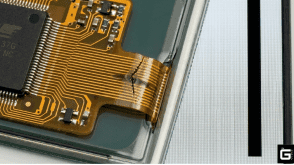
If an entire row or column abruptly goes completely black, it indicates a total physical severance of the electrical connection. A fatal TAB fault or a failure of the source/gate driver IC controlling that specific line is a terminal hardware failure.
Gate Driver IC Shorts and High Refresh Rate Stress
Pushing modern display panels to extreme refresh rates (240Hz, 360Hz, 500Hz) introduces severe, unrelenting electrical stress on the Gate Driver ICs.
- Bootstrap Capacitor Failure: High-side gate drivers utilize an internal bootstrap capacitor. At ultra-high refresh rates, the off-time (the blanking interval) becomes so minuscule that the bootstrap capacitor physically lacks the temporal window required to recharge.
- Voltage Droop: As the capacitor fails to recharge, the gate drive voltage experiences severe droop. This partial turn-on state drastically increases the drain-to-source resistance, generating localized, intense thermal output.
- Thermal Runaway: The Gate Driver IC overheats, causing a permanent short circuit or open fault, instantly killing an entire vertical column of pixels.
The Science / Research Insight: High-frequency isolated gate drivers operating in extreme refresh rate displays suffer from extreme thermal stress and overvoltage spikes. When the driving signal fails to achieve the required level shift, the resulting partial MOSFET switching exponentially increases conduction losses, inducing thermal runaway, gate oxide breakdown, and complete column logic failure.
What should I do if I discover a dead pixel?
A systematic triage process is required to determine if the panel legally qualifies for a Return Merchandise Authorization (RMA) claim.
- Verification: Execute the Parallax Test precisely to rule out trapped internal dust.
- Forensic Documentation: Load a full-screen white image at maximum brightness. Use a macro lens to capture a clear, perfectly focused photograph of the dead pixel and the surrounding grid.
- Count and Classify: Is it one isolated dead pixel, or a localized cluster? Document the exact numerical count of both dead and stuck pixels.
- Review the Tolerance: Cross-reference the specific monitor model with the manufacturer’s pixel defect policy (detailed below).
- Execution: Use a technically accurate script to bypass low-level support: “I am initiating an RMA for [Model Number]. Diagnostic workflows reveal [X] dead pixels, which mathematically exceeds the ISO 9241-307 Class II limits stipulated in your warranty documentation. Macro-photographic evidence of the TFT failure is attached.”
Could dead pixels be fixed?
The internet is hopelessly saturated with pixel fixer software and rapid color cycling tools (like JScreenFix). Frankly, these software solutions are largely snake oil when dealing with a true dead pixel.
- Software tools rapidly flash RGB colors at high frequencies to cycle the voltage state. If a pixel is merely stuck (experiencing a temporary capacitive lock), aggressive voltage cycling can occasionally shock the transistor back into normal operation.
- True Dead Pixels: If the a-Si:H TFT has physically degraded, the gate oxide has irreversibly ruptured, or the physical electrical connection is severed, no software code in existence can repair it. A true dead pixel requires professional repair or a complete panel replacement.
The “Pixel Massage” Myth vs. Liquid Crystal Physics
Let’s be real: executing a pixel massage is an incredibly efficient way to permanently destroy a perfectly good panel. The delicate liquid crystal layer is tightly sandwiched between fragile glass substrates heavily coated with Indium Tin Oxide (ITO) electrodes.
ITO is highly conductive and optically transparent, but it is notoriously brittle. Applying localized physical pressure crushes the ITO layer, causing microscopic stress fractures and permanent structural delamination. Massaging a dead pixel almost guarantees the mechanical destruction of the adjacent healthy pixels, rapidly expanding a single microscopic dot into a massive, unrepairable black smudge across the screen.
The Science / Research Insight: Indium Tin Oxide (ITO) films are highly susceptible to mechanical strain. Applying external localized pressure initiates severe buckle formation, stress-corrosion cracking, and physical delamination of the ITO layer, causing catastrophic, irreversible electrical failure in the surrounding pixel matrix.
Warranty Standards: Buying a monitor with dead pixel tolerances
The display industry does not expect absolute perfection. Panel manufacturers operate under strict statistical yield models. The ultimate benchmark for display defect tolerance is the ISO 9241-307 standard.
Demystifying ISO 9241-307 Defect Classes
- Type 1: Permanently illuminated pixel (stuck bright white).
- Type 2: Permanently black pixel (dead).
- Type 3/1 & 3/2: Defective subpixel (red, green, blue), constantly illuminated or constantly black.
Almost all standard consumer monitors are classified as Class II displays. The allowable defects scale proportionally with the resolution.
| Display Resolution | Total Pixel Count | Max Allowed Type 1 (Bright) | Max Allowed Type 2 (Dead) | Max Allowed Type 3 (Subpixel) |
| 1080p (Full HD) | 2,073,600 | 4 | 4 | 10 |
| 1440p (WQHD) | 3,686,400 | 7 | 7 | 18 |
| 4K (UHD) | 8,294,400 | 16 | 16 | 41 |
Under the strict interpretation of Class II, a manufacturer is legally within their right to outright deny an RMA for a 4K monitor even if it has 15 dead pixels scattered randomly across the screen.
Brand Policies: Dell vs. ASUS vs. Samsung
Premium brands attempt to differentiate themselves by offering superior pixel policies, though they are heavily littered with fine print.
- Dell / Alienware: Premium Panel Exchange means strictly 0 Bright Pixels allowed. Generally allows 1 to 5 dead/stuck pixels. They are highly regarded for accepting RMAs even for 1 dead OLED pixel in specific regions.
- ASUS (ROG): ZBD (Zero Bright Dot) for select high-end models (1-3 years). However, they utilize the notorious “15mm Rule”: RMAs are only accepted if 3+ defects are clustered within a 15mm diameter area.
- Samsung: Varies heavily. Zero Bright Pixel for specific top-tier models. Often strictly adheres to standard ISO minimums (3-5 defects). Support can be inconsistent.
Advanced Tech: Micro-LED Redundancy & Subpixel Layouts
The future of high-end emissive displays lies in Micro-LED technology. However, generic tech blogs miss the harsh engineering realities of mass transfer yields.
Micro-LED Mass Transfer Yield and In-Situ Repair
Micro-LED technology shrinks the individual RGB diodes to less than 50 micrometers. To build a standard 4K display, over 24 million microscopic LEDs must be flawlessly transferred.
Even with an industry-leading 99.99% yield, a 4K display will still possess 2,488 dead pixels straight off the assembly line. Because physical repair is economically catastrophic, engineers use redundant architectures. The display substrate is overpopulated with spare, unlit subpixels. When the internal sensing layer detects a dead pixel, the logic board triggers a spatial remapping algorithm, re-routing color data to an adjacent spare subpixel to artificially “heal” the visual blind spot.
RGB Stripe vs. PenTile: Impact on Defect Visibility
A major misunderstood issue regarding “dead pixels” stems from subpixel geometry. Standard monitors use a linear RGB stripe. Many gaming monitors (e.g., Gigabyte M27Q) use BGR or triangular PenTile layouts.
The Windows ClearType algorithm assumes all monitors use RGB. When it attempts to smooth text on an inverted BGR panel:
- It sends color signals to the wrong physical subpixel locations.
- It creates chromatic aberration—ugly fringes of magenta and green.
- These artificially generated dark gaps are routinely misdiagnosed as dead pixels. This is a software rendering failure, not a hardware defect.
The Science / Research Insight: Subpixel rendering algorithms utilize precise spatial color filtering to increase apparent text resolution. On an inverted BGR or WOLED pixel topology, the phase mismatch induces severe chromatic aberration and localized luminance drops, visually manifesting as false subpixel defects.
The Final Verdict: Acceptable Loss or Engineering Failure?
The industry narrative suggests dead pixels are an unavoidable compromise. Extensive laboratory testing demonstrates otherwise. The persistence of dead pixels in premium consumer hardware is a calculated failure of manufacturing economics, not a failure of physics.
Manufacturers have strategically chosen to scale resolution faster than error-free production lines, weaponizing standards like ISO 9241-307 to pass the financial cost of defect tolerance to the consumer. In the high-end display market, a clinical knowledge of semiconductor physics is your only defense against paying top dollar for a compromised panel.