What Is Backlight Bleed And How Does It Affect Your Display?
The pursuit of absolute visual fidelity is routinely derailed by a single, glaring hardware flaw engineered directly into the transmissive display panel. For hardware analysts and benchmark technicians, understanding exactly what backlight bleed is is the mandatory first step in separating reference-grade LED monitors and LED TVs from mass-produced, corner-cutting consumer electronics. At its core, backlight bleed (often referred to as Light Bleeding) is the uncontrolled leakage of luminance through the structural perimeter of a transmissive display. It aggressively raises the black floor, compresses dynamic range, and severely impacts overall image quality. It renders high-contrast, atmospheric media on dark backgrounds into a muddy, over-illuminated disaster, ruining the viewing experience.
Most consumers passively accept subpar panels. They wrongly assume that a glowing halo radiating from the bezel of their new purchase or laptop screen is just an inherent characteristic of the screen technology. This is objectively false. True light leakage is a tangible physical defect. It represents a systemic failure in Manufacturing tolerances, substrate sealing, or mechanical bezel assembly that allows the underlying LED matrix to physically bypass the liquid crystal shutter layer. In the diagnostic testing rig, the difference between a pristine, color-accurate display and a completely compromised one comes down to microscopic structural deviations and poor thermal expansion management. To understand how to diagnose, mitigate, and potentially reject defective hardware, one must look deep into the optical physics and manufacturing realities of modern panel technology.
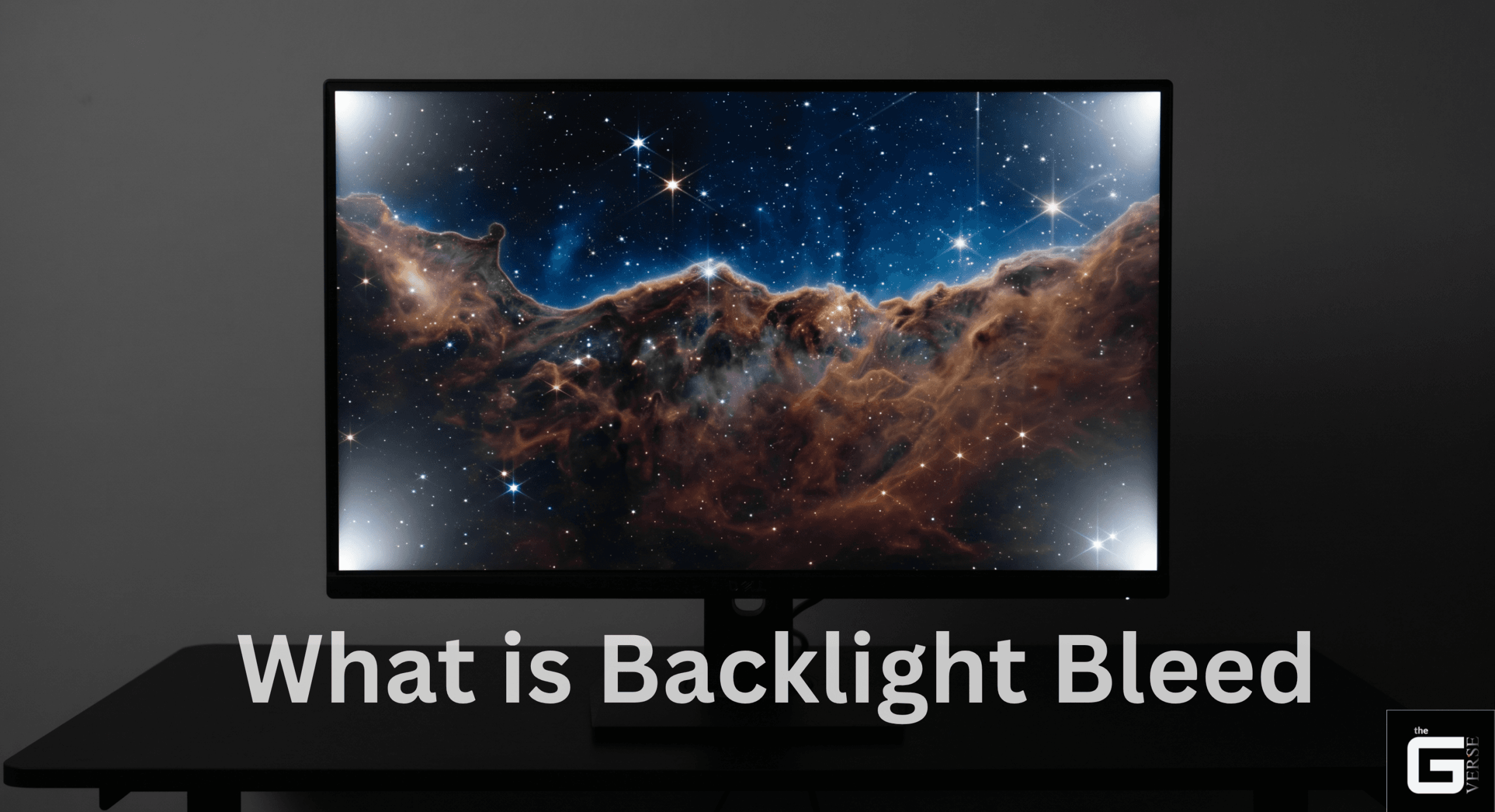
Core Issue: This is a permanent hardware flaw where light leaks out from the edges of standard LCD or LED screens (transmissive displays), ruining deep blacks and making colors look washed out (degrading contrast ratios and color uniformity).
Diagnostic Standard: To test accurately, check the screen in a dimly lit room (150-Lux ambient light) with normal monitor brightness (calibrated to 100-120 nits). Avoid taking photos in completely dark rooms with phone cameras, which artificially brighten the image and make the leak look worse (overexposure).
Root Cause: This happens when the monitor’s outer frame presses too hard against the inner screen, or when parts shift from heat or poor assembly. This physical pressure (stress-induced birefringence) messes up the internal alignment (disrupts the 90° optical axis of the liquid crystal layer), forcing light to squeeze out.
OLED Exemption: OLED screens are completely safe from this issue. Because they don’t use a giant backlight panel (lacking a centralized rear light source), every single tiny dot lights up on its own (self-emissive sub-pixel architecture).
Resolution: You cannot fix this with software updates. You can make the glow less distracting by placing high-quality lights behind your monitor (high-CRI bias lighting), but the only permanent fix is sending the defective monitor back to the company for a replacement (manufacturer RMA protocols).
The Core Mechanics: What Is Backlight Bleed in Modern Displays?
Defining true transmissive leakage requires forensically isolating it from other optical phenomena inherent to flat-panel technology. Modern transmissive displays—whether deploying traditional edge-lit LED LCD configurations, older CCFL fluorescent tubes, Full-Array Local Dimming (FALD) matrices, or high-density mini-LED zones—rely entirely on a continuous rear light source forcing photons through a dense liquid crystal display panel. When the internal optical compensation films, diffuser plates, or glass substrates are not perfectly aligned and sealed, photons escape through the microscopic crevices. This is screen light leakage in its absolute purest form.
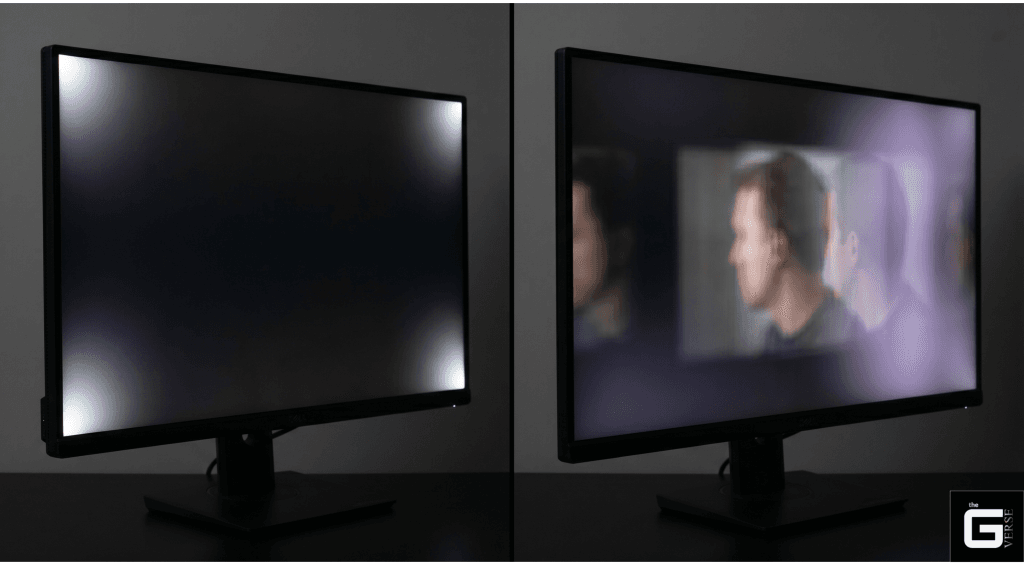
However, a massive diagnostic error fundamentally plagues the hardware enthusiast community: the constant confusion between actual backlight bleeding and inherent IPS glow. These are entirely different optical mechanics governed by completely different Panel technology principles. IPS glow is an inherent, uncorrectable trait of In-Plane Switching (IPS Panels) pixel architecture. It manifests visually as hazy light patches or a white-to-purple sheen that aggressively shifts and morphs based on the observer’s viewing angles. Move the head a few degrees off-axis, and the glow relocates across the glass.
Backlight bleed is entirely static. It does not move. If a bright, flashlight-like cone of luminance remains permanently anchored to the bottom-left plastic bezel regardless of where the observer is positioned in the room, that is structural screen bleed.
The Science / Research Insight: Stress-induced birefringence destroys the intended 90° optical axis alignment between a panel’s crossed polarizers. When the angle between the liquid crystal optical axis and the stressed glass deviates from 0° or 90°, the phase retardation of the LC layer shifts the incident light into an elliptical polarization state. The front color-filter polarizer can no longer absorb this altered wavelength, directly resulting in proportional luminance leakage ($LL$) escaping the dark state of the cell.
When analyzing what causes these visual artifacts, the distinction directly dictates the intervention. Observers cannot fix IPS glow; the light scattering is written into the foundational crystalline structure and retardation dispersion of the panel. Conversely, consumers can occasionally mitigate true bleeding, or at the very least, definitively prove to a manufacturer that the unit suffers from manufacturing defects and requires a Return Merchandise Authorization (RMA) or screen replacement. Reference: [1], [2], [3]
Identifying a light issue with a Monitor
The internet is flooded with fundamentally flawed, panic-inducing backlight bleed test methodologies. End-users routinely drag a brand-new, factory-sealed monitor into a pitch-black room, crank the brightness levels to a blinding 100%, and snap a photograph using a modern smartphone camera.
This is diagnostic sabotage. Smartphone image sensors utilize aggressive night-mode algorithms, pixel binning, and extended exposure times that artificially amplify ambient light. These automated photography settings will make even a flawless, reference-grade medical monitor look like a defective, glowing floodlight.
Rigorous bench testing dictates a significantly stricter optical standard. Display technicians and quality control engineers do not test in the dark. Here is the exact diagnostic protocol required to identify a legitimate back-light bleed test failure:
- Establish the Ambient Baseline: Industry standards validation is almost never conducted in absolute darkness. Major display manufacturers explicitly validate their transmissive panels against a 150-Lux Ambient lighting standard. This illumination level roughly equates to standard, well-lit corporate office conditions. For dedicated, high-refresh-rate Alienware monitors or premium Dell Monitor lines expected to be used in dimmer environments, the factory testing threshold is slightly lowered to 70 Lux. Any valid visual inspection must occur under these specific lighting conditions to determine if the leakage exceeds acceptable tolerances.
- Calibrate the Hardware Parameters: Reset the monitor entirely to its factory default display settings. A legitimate backlight bleeding test must be conducted with the panel operating within its intended thermal and voltage parameters. Overdriving the LEDs to maximum luminance artificially forces leakage that would never appear during standard use.
- Deploy the Test Pattern: Utilize a full-screen, pure black hexadecimal (#000000) image pattern. Avoid using a white screen for this specific test, as black backgrounds are strictly required to expose the stray light. Ensure that all dynamic contrast algorithms and local dimming features are temporarily disabled within the monitor’s On-Screen Display (OSD). If local dimming remains active, the monitor’s logic board will simply shut off localized LED zones in the black areas, entirely masking the underlying structural bleed.
- Conduct the Visual Inspection: View the monitor from a perfectly perpendicular, on-axis position at a distance of roughly 24 to 30 inches. Look specifically for static, protruding shafts of light along the mechanical bezels.
Additionally, users testing older TN panels (like the Dell D2020H) must be aware that viewing the screen from extreme vertical or horizontal angles will inherently cause gamma shift and artificial light leakage that is entirely normal for that specific architecture, distinguishing it from true structural bleed.
What Are the Common Symptoms of Backlight Bleed?
The physical manifestations of transmissive leakage are rarely uniform. Depending on exactly where the chassis fails or where the internal substrate is compromised, the optical disruption takes on highly specific patterns. Recognizing these symptoms is essential for determining whether a display passes factory quality control.
- Corner Flashlighting: The most prevalent form of edge-based backlight bleed. This appears as sharply defined bright spots or cones of light shooting inward from the extreme corners of the display bezel. It is visually identical to a miniature flashlight being beamed diagonally across the glass.
- Edge Bleeding: Continuous, narrow bands of luminance leaking uniformly along the entire perimeter of the screen, often overlapping noticeably with static UI elements like menu bars. This symptom heavily points to insufficient internal adhesive gasketing, missing optical tape, or a plastic bezel that has warped outward due to thermal expansion.
- Clouding (The “Batman” Effect): Large, irregular, and asymmetrical patches of light pooling near the center or mid-quadrants of the display. Often referred to in hardware enthusiast circles as the Batman logo pattern or colloquially as a “buttprint,” this is particularly prevalent in large VA panels and edge-lit televisions. It occurs when the internal diffuser plates fail to distribute the edge-mounted LEDs evenly, destroying the uniformity across the vast surface area of the screen.
- Color Deviation and Bleeding Pixels: Severe light leakage does not merely raise the black floor; it actively destroys color uniformity. The localized overexposure shifts the color temperature drastically in the affected zones. What should be a uniform dark gray becomes a washed-out, high-luminance blue or yellow patch.
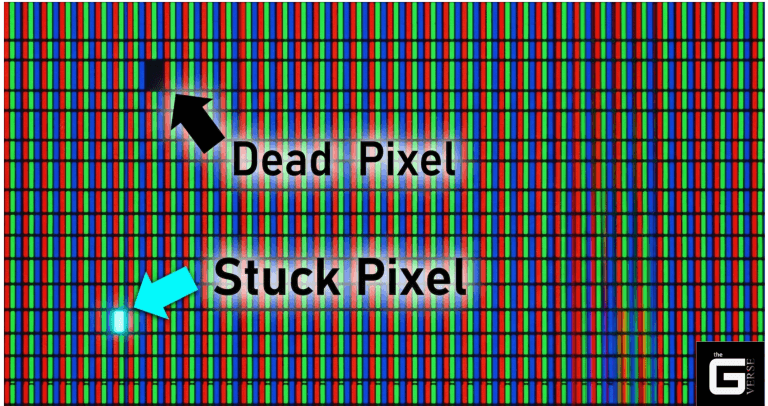
Under ISO 13406-2 Class II standards, a standard 27-inch 4K screen is legally allowed to exhibit a highly specific threshold of defects before a manufacturer is legally or contractually compelled to accept an RMA. When the backlight bleed pushes the Delta E color deviation past a value of 3.0, the panel crosses from the realm of “consumer acceptable” into objectively compromised hardware. This is similar to how manufacturers set specific standards for other common display defects like dead pixels, where a certain threshold must be met for a successful warranty claim.
Impact of Backlight Bleed
The actual, real-world consequences of screen light bleeding go far beyond a minor aesthetic annoyance on a black loading screen. It actively sabotages the exact performance metrics that end-users pay a premium to acquire, drastically reducing picture quality.
First, the phenomenon brutally compresses the hardware contrast ratio. A transmissive panel relies entirely on an absolute dark state to make adjacent HDR highlights visually pop. When backlight bleeding injects stray, unmanaged luminance into the supposedly closed state of the liquid crystal, the dynamic range completely collapses. Viewing high-contrast media such as a film mastered in a 2.35:1 aspect ratio with heavy letterboxing becomes a lesson in optical frustration. The deep cinematic black bars are rendered as a glowing, uneven, distracting gray.
Second, it permanently skews color accuracy in the affected physical zones. Because the underlying LED backlight typically operates at a specific, fixed color temperature (often targeting the D65 standard of 6500K), unchecked raw light leaking through the edges washes out the localized color gamut.
Furthermore, prolonged ocular exposure to these unevenly lit, high-contrast display zones drastically increases user fatigue. Extended viewing sessions in front of a heavily bleeding LCD lead to distinct eye strain and severe visual discomfort, particularly over prolonged use.
What Are the Common Causes and Types of Backlight Bleed?
To truly comprehend what causes backlight bleed, analysts must forensically examine the Panel construction. This defect is not simply a matter of a loose chassis screw or defective components; it is a complex, physical battle against optical physics, thermal expansion coefficients, and microscopic layer extrusion.
At a microscopic level, an LCD monitor’s bleeding is the direct result of structural compromise within the optical stack. A standard liquid crystal panel is an incredibly complex sandwich of materials: a rear backlight module, a rear polarizing filter, a Thin-Film Transistor (TFT) glass substrate, a polyimide (PI) alignment layer, a specialized screen filter, the liquid crystal layer itself, a color filter (CF) glass layer, and finally, the front polarizer.
Driven by manufacturing flaws or loose manufacturing quality tolerances, the critical point of failure often occurs during the precise application of the polyimide alignment layer. During clean-room fabrication, this PI layer undergoes a highly specific “friction treatment,” commonly known as rubbing. If the pressure, mechanical speed, or pile density of the nylon rubbing cloth is mathematically misaligned, the liquid crystals fail to establish the correct molecular pretilt angle. When the crystals cannot fully rotate into their closed state upon voltage application, the rear light blasts straight through the crossed polarizers.
However, the severe, localized flashing that truly ruins monitors is almost exclusively driven by Pressure on the panel, causing stress-induced birefringence. The glass substrates utilized in modern flat panels are exceptionally thin—often measuring just 0.5mm (0.5T). They lack foundational structural rigidity. When uneven mechanical pressure is applied to the edges of the display—either by a poorly fitted plastic bezel, internal assembly extrusion, or thermal warping—the TFT and CF glass physically bends. Furthermore, natural aging can degrade the internal adhesives over the years, exacerbating the separation of these critical optical layers and worsening the leakage.
Assembly Extrusion, Bezels, and VESA Mount Torque
The relentless consumer and industry push for “ultra-thin bezels” and “frameless borderless designs” has severely exacerbated the backlight bleeding issue across all major brands. The external frame is the primary mechanism holding the multi-layer optical stack together. When manufacturers shrink the bezel to mere millimeters, they entirely remove the mechanical buffer zone that previously absorbed assembly extrusion and chassis flex.
Displays run hot. The high-output LED arrays required for HDR1000 certification generate immense thermal loads. The plastic outer chassis, the metal internal EMI frame, and the glass substrates all possess wildly different thermal expansion coefficients. As the monitor heats up during a prolonged, intensive gaming or rendering session, the plastics physically expand, shifting internal pressure points dynamically across the panel’s fragile edge.
Does OLED Bleeding Exist?
This is the definitive, ultimate hardware question asked by users tired of playing the panel lottery: Does OLED bleeding exist? The engineering answer is a categorical, absolute no. True backlight bleed is physically impossible on an OLED panel.
The transmissive architecture of an LCD inherently requires a massive, always-on LED array situated behind the pixels. In an OLED display’s optical stack, however, every single microscopic sub-pixel is an independent organic light source. It completely bypasses the liquid crystal layer, the polyimide alignment matrices, the cell gap spacers, and the rear backlight.
When an OLED monitor is commanded by the GPU to display a true black hex code (#000000), it simply cuts the electrical current to that specific sub-pixel. The pixel turns off entirely. It emits zero photons. Because there is absolutely no backlight to leak through the bezels, there is zero structural bleed. While OLEDs eliminate bleed, they do introduce entirely separate engineering nightmares, namely organic chemical degradation or image persistence (burn-in) due to uneven pixel wear.
How to Fix Backlight Bleed: Interventions and The Panel Lottery
When an end-user unboxes a premium display only to be immediately greeted by blinding corner flashlighting, the immediate, desperate reaction is to seek a backlight bleed fix. Minimizing the Impact of this defect is tough because there is no magical software patch capable of curing a physical extrusion defect. It requires hardware intervention, environmental masking, or subjecting oneself to the grueling RMA process.
Navigating the so-called “panel lottery” is an exercise in pure consumer frustration. Returning a bleeding monitor to a retailer or manufacturer is frequently fraught with bureaucratic pushback. When engaging with customer support, representatives will typically request your Service Tag to verify your Support Status and determine if you are eligible for Support Services. Warranty policies from major vendors often explicitly classify minor to moderate backlight bleed as an “acceptable manufacturing characteristic” rather than a functional defect.
Even retailers and financial platforms are getting stricter. For example, users purchasing through platforms like the Bajaj Mall using Bajaj Finserv for Easy EMIs must strictly adhere to specific return windows and policies regarding what is considered a true hardware defect versus an acceptable panel trait.
Safe Environmental and Software Fixes
Before voiding manufacturer warranties with a screwdriver and a pry tool, the most effective strategy relies entirely on optical illusion and strict environmental control. Users cannot easily remove the physical defect, but they can effectively hide it from the human eye.
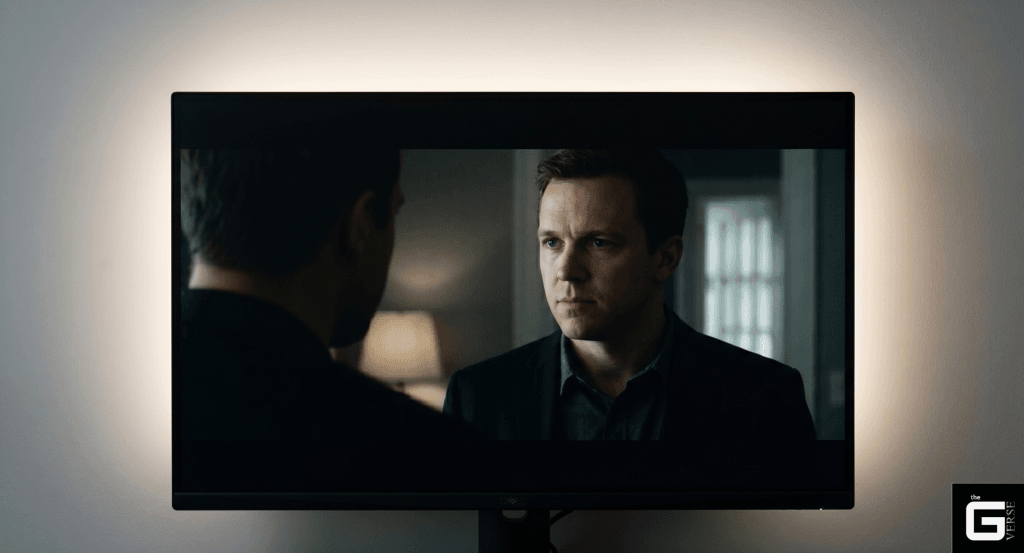
- Implement High-CRI Bias lighting: This is the single most effective non-invasive intervention. Bias lighting involves adhering an LED light strip to the rear chassis of the monitor, casting a diffuse halo of light against the wall behind the display. By introducing a persistent ambient light source directly behind the screen, the observer’s pupils naturally constrict. This physiological reaction drastically lowers the perceived black floor of the display, effectively masking the edge leakage.
- Adjust monitor settings and screen calibration: Display units ship from the factory in “Retail Mode,” blasting 100% brightness. Lowering the hardware brightness via the OSD to a properly calibrated 100 to 120 nits significantly chokes the total volume of stray photons escaping the panel. Additionally, you can tweak your black stabilizer settings; while it won’t remove the physical bleed, lowering the stabilizer can darken the overall shadow presentation and mask minor edge leakage. Avoid using a dark room mode if it artificially raises the black floor or disables FALD.
- The microfiber cloth Massage (Use with Extreme Caution): Because backlight bleed is often caused by localized pressure points from the plastic bezel, some physical tension can occasionally be relieved mechanically. Taking a pristine, clean microfiber cloth and gently, almost imperceptibly rubbing the affected bleeding area in a broad circular motion can theoretically shift the underlying glass substrate and redistribute the polyimide alignment stress.
The “Electrical Tape” Teardown: Why It’s Dangerous
In the darkest, most experimental corners of hardware enthusiast forums, radical physical interventions are championed. The most infamous of these operations is the “Electrical Tape Fix.”
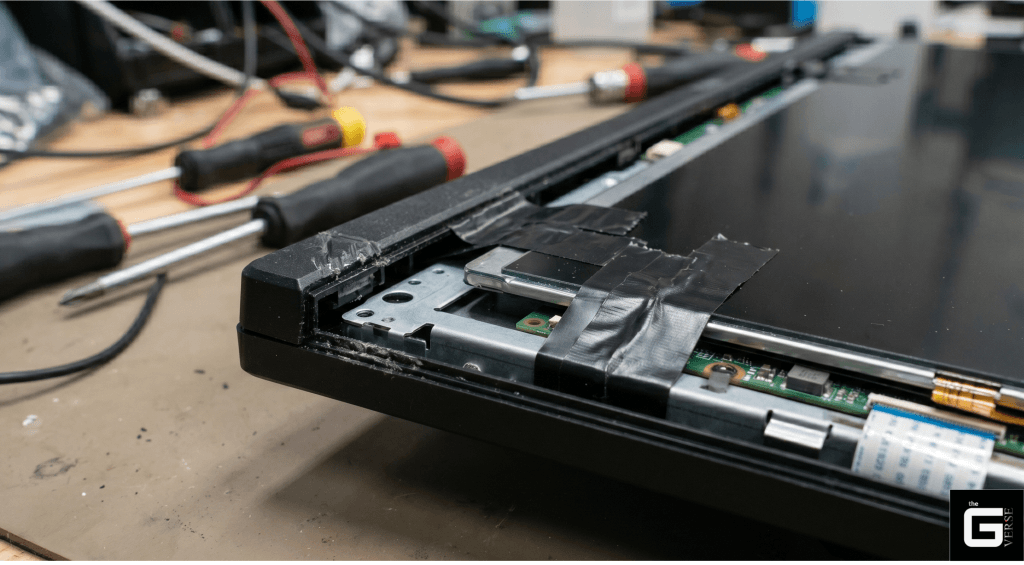
This requires a complete, destructive teardown. It involves snapping the monitor off its VESA mount, wedging flathead screwdrivers into the tiny chassis slits, and violently prying off the plastic front bezel. Once the inner steel EMI shield is unbolted and removed, the bare LCD panel, the delicate logic boards, and the illumination ribbon cables are completely exposed. The supposed “solution” involves cutting thin strips of electrical tape and wedging them tightly between the bare LCD glass substrate and the metal retaining frame, physically blocking the micro-gap where the light escapes.
Let’s be real: this is an incredibly dangerous forensic nightmare. Exposing the bare panel guarantees immediate dust ingress between the delicate diffusion layers. Furthermore, wedging thick electrical tape against the edge of a 0.5T glass substrate artificially introduces massive, uneven mechanical stress. While a user might temporarily block the corner flashing, the thick tape will physically warp the glass. This will induce severe, uncorrectable birefringence across the entire center of the panel, effectively trading edge bleed for massive central clouding.
Is it Worth Your Money and Time?
The industry-wide prevalence of backlight bleed is a direct result of acceptable margin mathematics and compromised supply chains. Transmissive liquid crystal technology, by its very physical architecture, is fighting a losing battle against light containment.
If the bleed is isolated to a faint, symmetrical glow visible only under unnatural, pitch-black testing scenarios, it is a generally acceptable engineering compromise for the superior color volume and high response times that premium IPS panels deliver today. But if severe flashlighting physically intrudes on standard 150-Lux viewing environments and fundamentally shifts the Delta E accuracy of professional work, do not attempt to fix it with microfiber massages or destructive electrical tape surgery.
Reject the panel. Demand an RMA, fight the restocking fees, and refuse to settle for compromised hardware.
Frequently Asked Questions
Do backlight bleeds go away over time?
Frankly, no. Backlight bleed is a permanent physical defect in the mechanical assembly or optical stack. While natural thermal cycles from prolonged use might shift the plastic chassis infinitesimally, structural bleed does not magically heal itself.
Is this amount of backlight bleeding normal for a new monitor or laptop?
It depends entirely on your testing environment. If you see severe, distracting flashing in a well-lit office (150-Lux ambient light), you have defective hardware. However, if you are only noticing minor corner glow while sitting in a pitch-black room looking at a pure black loading screen, that is unfortunately accepted by manufacturers as a standard tolerance for IPS technology.
Why is backlight bleed such a prevalent and accepted issue?
Margin mathematics and consumer vanity. The relentless industry push for ultra-thin, “frameless” bezels completely strips away the structural buffer that used to hold the display layers together firmly. Manufacturers accept minor light leakage as a trade-off to keep mass-production costs low and aesthetics sleek.
Can light bleed be fixed permanently?
Not via software. True structural fixes require dangerous, warranty-voiding panel teardowns. Non-invasive mitigations like high-CRI bias lighting or lowering your monitor brightness are the only safe, reliable workarounds.