True Difference Between Mechanical Keyboard and Normal Keyboard
You are probably ruining your hands right now. And the worst part? You paid a corporation for the privilege.
If you search for the difference between mechanical keyboard and normal keyboard hardware, you get spoon-fed a mountain of marketing garbage. Reviewers will ramble about RGB backlighting and clicky noises. Nonsense. The real gap? Applied physics. Materials science. And whether or not your flexor tendons will survive the next five years of typing.
Let’s strip away the generic tech-blog fluff. What follows is built on published ergonomics research, manufacturer specifications, and the measurement work of independent switch testers. Here is the raw, ugly truth about what you are putting your fingers through every single day.
The Fundamental Architectural Paradigm: Difference Between Mechanical Keyboard and Normal Keyboard
Standard office keyboards are built on a philosophy of extreme cheapness. Cost-efficiency over human comfort. The digital search landscape superficially reduces the keyboard debate to basic acoustics. They entirely miss the profound divergence in underlying structural engineering. The paradigm shift hinges on how your kinetic energy is translated into an electrical signal.
The Anatomy of Membrane and Rubber Dome Keyboards
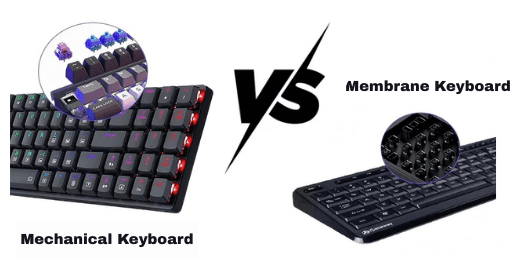
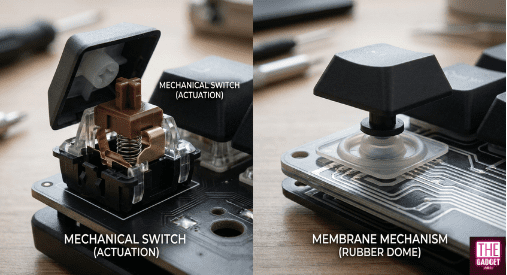
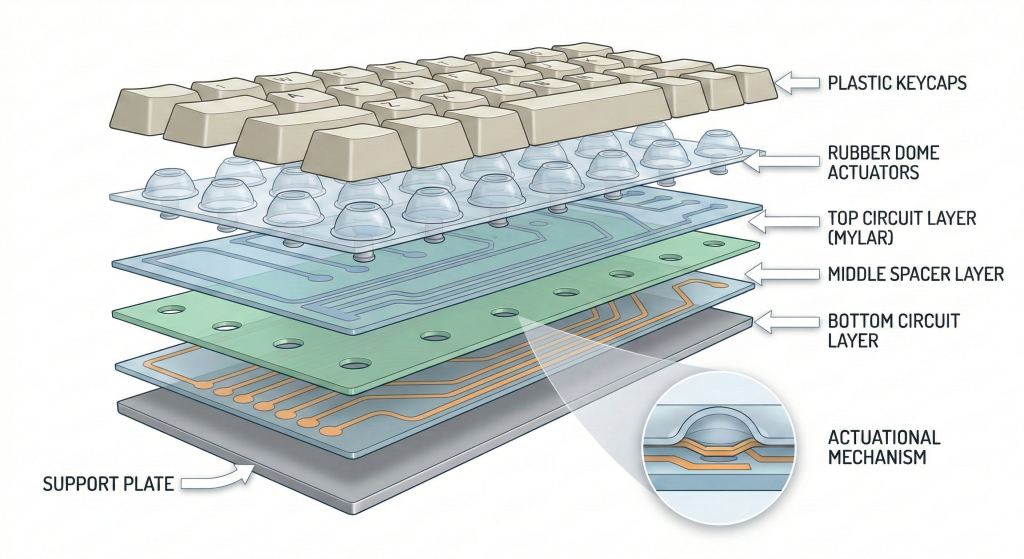
Normal keyboards—generally built as membrane or rubber dome designs—operate on a rudimentary pressure-pad electrical system. The foundational architecture relies on a continuous, unified sheet of molded silicone or elastomer rubber domes sitting atop a printed circuit.
If you’ve typed on an aging membrane board, you know the exact sensation. The heavily used “E” and Spacebar keys feel sluggish and erratic compared to the rarely used peripheral keys. This unified sheet design inherently limits user customization and creates a grossly inconsistent typing experience across the entire peripheral.
Pressure-Pad Circuitry and Spacer Matrices
The electrical logic here is housed within three distinct, flexible Mylar layers. Peel those translucent sheets apart and the fragility is obvious. The top and bottom layers feature printed conductive traces, separated by an inert spacer layer containing precise cutouts.
This is where the chemistry fails. These circuits are screen-printed using silver-filled conductive inks. Put silver traces in a humid room, add electrical current, and you get a failure mode known as “silver migration” — enough of a known problem that ink manufacturers sell carbon overprints specifically to suppress it. The silver ions migrate across the insulating layer and permanently short-circuit the board. It functions literally by mashing two loose wires together via sheer physical pressure. It is built to die.
Elastomer Dome Buckling and the Zero-Cushion Actuation
The defining operational flaw of the membrane mechanism is that the switch cannot register an electrical signal until the elastomer dome reaches its absolute structural failure point.
When downward force is applied, the rubber provides non-linear resistance until it buckles. It violently collapses, pushing the top conductive trace through the spacer layer to bridge the circuit. Because actuation occurs simultaneously with the physical end of the key’s travel distance, your finger absorbs the entirety of the kinetic shock against the rigid plastic baseboard. There is zero mechanical “cushion”. It feels like repeatedly striking a solid piece of wood.
The Anatomy of Discrete Mechanical Switches
Mechanical variants utilize a sophisticated array of discrete, individual micro-switches mounted to a rigid fiberglass PCB — soldered in place on traditional boards, seated in hot-swap sockets on modern ones. This modular architecture sits in a long line of discrete-keyswitch designs that includes the iconic IBM buckling spring.
Because every single key operates entirely independently of its neighbors, the keyboard achieves unparalleled durability. Modern mechanical switches—like Cherry MX, Gateron, or Kailh variants—carry manufacturer ratings of roughly 50 million to 100 million actuations. Plus, hot-swappable ecosystems mean a switch puller replaces a single dead key rather than the whole board going in the trash.
Stem Geometry, Polycarbonate Housings, and Crosspoint Contacts
A traditional mechanical switch is an engineering marvel. It is composed of a polycarbonate or nylon housing, a coiled metal spring, a stem, and two delicate copper alloy contact leaves.
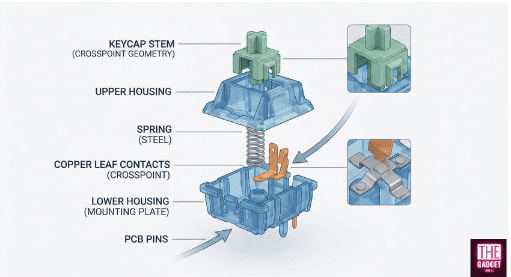
The stem is typically molded from Polyoxymethylene (POM), a highly ordered crystalline thermoplastic. POM’s low sliding friction against both plastic and metal is what earns it the “self-lubricating” label on engineering datasheets. As kinetic force pushes this slick stem downward, precision-engineered plastic legs slide against the copper leaves. Once the stem clears a specific physical threshold, two gold-plated crosspoint contacts snap together, completing the circuit with absolute mechanical certainty. The gold plating isn’t for looks; it prevents microscopic oxidation.
The Physics of Actuation: A Biomechanical Analysis
The tactile superiority of mechanical keyboards is a measurable application of classical physics. By replacing non-linear rubber domes with highly calibrated metal springs, engineers precisely dictate the force-displacement curve of every keystroke. This transforms typing into a highly tuned biomechanical interaction.
Hooke’s Law and the Mechanics of Helical Springs
The resistance generated by a mechanical switch is mathematically governed by Hooke’s Law of elasticity. Expressed by the formula F = -kx, the restoring force (F) exerted back against your finger by the internal helical spring scales in a perfectly linear trajectory relative to the distance (x) it is displaced, with the negative sign denoting the opposing direction of the resistance.
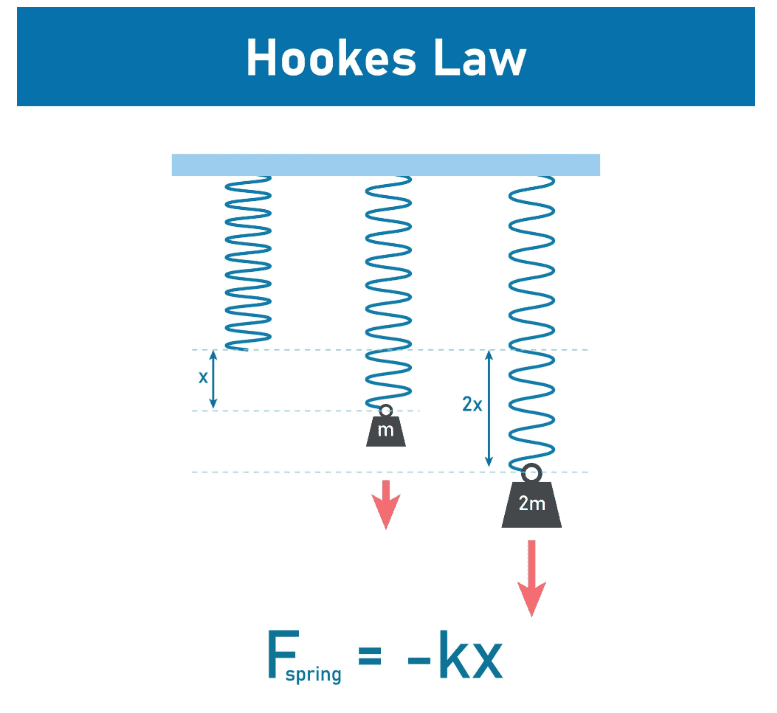
The resistance profile is locked to the spring’s unique constant (k), a metric set by the steel’s shear modulus together with the wire gauge, the coil diameter, and the number of active coils. Because force scales with how far the spring has already been compressed, a linear switch feels heavier at the bottom of the keystroke than at the top.
Switch Preload and Initial Kinetic Resistance Profiling
In the context of keyboard engineering, Hooke’s Law must be modified to account for “preload.” The equation governing the force exerted against the typist’s finger is actually F=k(x+P), where P represents the precise distance the spring is already compressed while trapped inside the resting switch housing.
Spring swapping exploits this directly. Swapping a standard 14mm spring for a longer two-stage spring of the same nominal weight rating increases the preload (P). This creates a heavier initial push-feel without altering the ultimate bottom-out force.
Decoupling Actuation Force from Bottom-Out Force
The most critical biomechanical advantage of mechanical architecture is the total decoupling of the actuation point from the bottom-out point.
Because the plastic stem forces the copper leaves together mid-stroke, a mechanical switch typically registers the electrical signal after only 2.0 millimeters of travel, despite possessing a total travel distance of 4.0 millimeters. Does keyboard matter for gaming? Yes. Competitive gamers exploit this by purchasing “speed” switches with ultra-shallow 1.0mm actuation points. They register inputs with a mere twitch of the finger, bypassing the need to press the key down fully.
The Ergonomic “Cushion” and Deceleration Physics
The mathematical delta between the actuation force and the bottom-out force engineers a vital physical “cushion”. For instance, if a tactile switch actuates at 55 grams of force but requires 65 grams to bottom out, that 10-gram gap acts as a braking mechanism.
Once you feel the tactile bump and the key registers, the increasing resistance of the spring naturally decelerates your finger. It prevents you from harshly slamming your joints into the rigid baseplate. Typists who learn to release at the actuation point instead of driving every key to the floor get the full benefit of that braking zone. Membrane rubber domes have no equivalent gap to work with, because the dome collapses and actuates at the same instant.
Elastic Hysteresis in Mechanical Switch Action
The sophisticated mechanics of discrete switches introduce complex physical phenomena, most notably hysteresis. Within a mechanical switch, the force curve required to push the stem downward (downstroke) is measurably different from the upward force the spring exerts to return the key to its resting state (upstroke).
While the spring steel itself generates negligible elastic hysteresis, significant kinetic friction occurs between the plastic stem legs and the metallic leaves.
Sliding Friction vs. Upstroke Return Force Dynamics
This internal sliding friction acts in direct opposition to movement. You push against both spring tension and friction on the way down, but only receive the spring tension minus friction on the way back up.
This deliberate mechanical hysteresis results in a reset point that is physically higher than the actuation point. This is an intentional engineering feature; it prevents the electrical circuit from rapidly fluttering on and off if your finger slightly trembles at the actuation threshold. Enthusiast keyboard builders intentionally alter this frictional hysteresis by applying thick PFPE-based greases, such as the PTFE-thickened Krytox 205g0, to the switch stems to smooth out this delta.
Ergonomics and Repetitive Strain Injury (RSI) Validation
Prolonged computer usage forces the human musculoskeletal system into static, unnatural postures while demanding rapid, repetitive kinetic movements. This ergonomic paradox is a primary catalyst for Repetitive Strain Injuries (RSI) and Work-Related Upper Limb Disorders (WRULD). Everything below is drawn from peer-reviewed ergonomics literature, including NIOSH-funded work on carpal tunnel pressure.
Electromyography (EMG) and Fingertip Applied Force
Typing demands the relentless contraction of the flexor digitorum superficialis and profundus muscles located in the forearm. A University of California ergonomics group led by David Rempel measured exactly this, recording finger flexor electromyograms and applied fingertip force while experienced typists worked on keyboards of differing switch resistance.
The data reveals a disturbing behavioral truth. In the same group’s keyboard reaction-force work, typists struck keys with an average peak force of roughly 2.5 N against switches that made at 0.47 N — about 5.4 times more force than the switch actually needed.
The 0.47 Newton Medical Threshold for Flexor Tendon Load
Because typists drastically overcompensate their strike force, the baseline weight of the keyswitch becomes a critical medical vector. Rempel and colleagues, publishing in Ergonomics in 1997, put ten experienced typists on three keyboards with keyswitch make-forces of 0.34 Newtons (N), 0.47 N, and 1.02 N.
The empirical results demonstrated a severe physiological threshold. Moving from 0.47 N to 1.02 N raised applied fingertip force by approximately 40% and forearm EMG activity by approximately 20%. Between 0.34 N and 0.47 N there was no measurable difference at all. The authors’ own recommendation: prefer switches making at 0.47 N or less over 1.02 N switches. Translating these abstract Newtons: 0.47 N equals approximately 48g. If you suffer from tendon pain, be wary of heavy mechanical switches like 60g Cherry MX Blacks.
| Keyswitch Make-Force (Newtons) | Equivalent Grams-Force | Applied Fingertip Force | Forearm EMG Activity |
|---|---|---|---|
| 0.34 N | ~35g | Baseline | Baseline |
| 0.47 N | ~48g | No Significant Change | No Significant Change |
| 1.02 N | ~104g | +40% Spike | +20% Spike |
Muscle Potentiation and Dynamic Loading Fatigue
Sustained typing on heavy mechanical switches induces dynamic loading fatigue. However, swinging too far in the opposite direction creates a new hazard.
Utilizing ultra-light mechanical switches (e.g., 20g to 30g springs) can replace dynamic fatigue with isometric static loading. If a spring is lighter than the weight your relaxed fingers rest with, keys start registering on their own, and you are forced to hold your fingers elevated in a rigid “hover” posture instead. That sustained hover is static muscle load, which is exactly why typists who rest their hands on the keycaps are usually steered toward heavier springs rather than lighter ones.
Wrist Posture: Extension and Ulnar Deviation
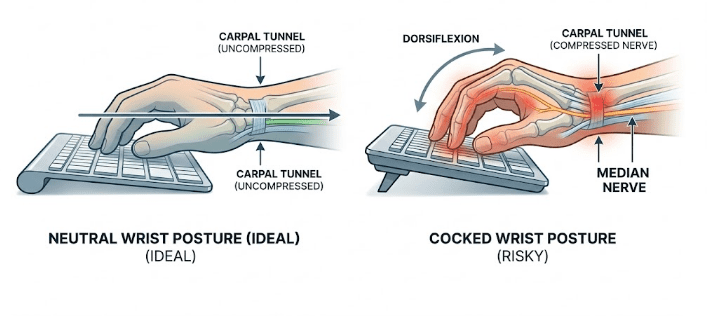
While the internal springs offer superior force-curve optimization, the external chassis geometry of a mechanical keyboard presents a severe ergonomic liability. Standard mechanical keyboards are significantly thicker than flat membrane boards. This elevated chassis forces your hands to angle upward, pushing the wrists into a state of chronic dorsiflexion, commonly referred to as wrist extension.
The carpal tunnel serves as a narrow biological conduit for the median nerve and nine flexor tendons. Extreme extension suffocates this space.
Carpal Tunnel Fluid Pressure Spikes at 30-Degree Dorsiflexion
Keir, Bach, Hudes and Rempel measured carpal tunnel pressure directly in 37 healthy participants while the wrist moved through extension, flexion, and radioulnar deviation.
A flat, neutral wrist keeps pressure at baseline. Their guideline figure for extension is 32.7 degrees — the angle that holds three quarters of the population below 30 mmHg, with a confidence interval running from 27.2 to 38.1 degrees. Individuals vary, and some participants never reached that pressure at all. Sustained pressure at this level is what compresses the median nerve. I strongly condemn the common practice of deploying the small pop-up kickstands on the back of mechanical keyboards. “Positive tilt” actively increases dangerous dorsiflexion.
Mitigating Strain via Negative Tilt Geometry and Tenting
To neutralize the hazards of the mechanical chassis, geometric intervention is required. Simoneau, Marklin and Berman tested keyboard slopes of +7.5, 0, -7.5 and -15 degrees on sixteen experienced typists: wrist posture moved from roughly 12 degrees of extension at +7.5 degrees to 3 degrees of flexion at -15 degrees. The authors are careful to note that the injury-prevention consequences have yet to be established, but the posture improvement itself is not in dispute.
A firm, high-density wrist rest is the practical way to introduce negative tilt under a thick mechanical chassis; soft gel rests compress under load and hand the extension straight back. Furthermore, adopting a split mechanical keyboard architecture physically separates the hands, reducing painful ulnar deviation.
Digital Signal Processing: Debounce and Matrix Scanning
The physical collision of components is only the first phase of a keystroke. The subsequent challenge lies in translating kinetic impact into flawless digital logic. Both architectures interface with a microcontroller unit (MCU) to process electrical state changes and transmit USB HID scan codes. The physics of how these two switch types bridge their circuits demand radically different approaches to digital signal processing.
Contact Bounce and Micro-Vibrational Physics
Mechanical switches are bound by the laws of kinetic collision. When the POM stem pushes the copper leaves together, the connection is never clean.
Upon the initial microscopic impact, the metal contacts violently rebound. They vibrate off one another, creating a chaotic series of rapid “on-off” electrical ripples that typically settle within a few milliseconds, though the exact time varies with switch type, age, and pressing technique. This phenomenon, known as “switch bounce,” is an unavoidable consequence of using hard metal contacts, and it is plainly visible on an oscilloscope trace.
Firmware Filtering Algorithms and the 5ms Latency Tax
If a microcontroller blindly accepted raw data, a single press would register as a dozen frantic characters—a catastrophic failure known as “key chatter”. Mechanical keyboards implement digital sieves within their firmware known as “debounce logic”.
Standard defer algorithms instruct the MCU to wait until it is certain the metal leaves have stopped vibrating, adding a latency tax to every keystroke. QMK’s documented default is sym_defer_g on a 5 millisecond debounce window; commercial firmware often sits higher. Switching to an eager algorithm such as sym_eager_pk reports the keypress the instant first contact is detected, then locks that key out for the debounce window instead — faster, but explicitly not noise-resistant. Pair that with a high USB polling rate — 1000Hz gives a 1ms reporting interval, 8000Hz gives 0.125ms on hardware that supports it — and firmware stops being your bottleneck. Polling interval is only one term in total input latency, not the whole of it.
| Firmware Algorithm | Added Latency | Double-Tap Risk | CPU Load | Best Use Case |
| Conservative (Defer) | 5ms – 15ms | Near Zero | Low | Standard Typing |
| Aggressive (Eager) | ~0ms | Low to Moderate | High | Competitive FPS |
Electrical Matrix Ghosting vs. N-Key Rollover (NKRO)
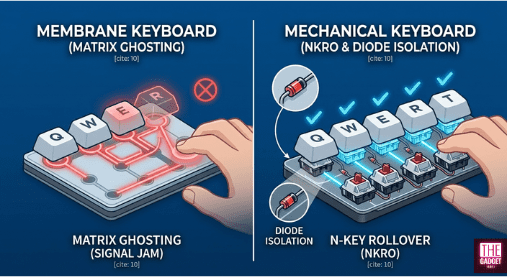
Normal membrane keyboards employ a cost-saving column-and-row scanning matrix without isolating components. When a typist presses a complex combination of keys, the overlapping circuits create phantom current paths the MCU misreads. Registering a key you never touched is “ghosting”; the usual countermeasure is “blocking”, where the controller simply refuses the third key so no phantom can appear — which drops the input you did make. Membrane boards have nowhere to mount per-key diodes, so they typically guarantee only two simultaneous keys, extended to a handful of gaming-cluster keys on better models. If you are holding W, A, Shift, and attempt to press Spacebar in a competitive match, the hardware literally fails you.
Diode Isolation and Infinite Simultaneous Keystroke Polling
The fundamental digital advantage when looking at a mechanical keyboard vs normal keyboard is how mechanical variants resolve the ghosting matrix flaw through the integration of discrete electrical diodes.
A diode is soldered onto the PCB in series with every individual switch. These diodes act as one-way valves, strictly preventing electrical current from flowing backward through the matrix and crossing wires. This electrical isolation unlocks true N-Key Rollover (NKRO). A diagnostic utility like PassMark KeyboardTest makes it visible: on a true NKRO board, 20+ keys held at once all register simultaneously on screen.
Decoding User Pain Points: The Mechanical Keyboard vs Normal Keyboard Debate
The recurring complaints on hardware forums such as r/MechanicalKeyboards cluster around a few distinct physical pain points, and both architectures have their own. Correlating those complaints with materials science demystifies most of the tribalism surrounding keyboard preferences.
The “Mushy” Tactile Degradation Arc of Elastomers
The most ubiquitous condemnation of normal membrane keyboards is their propensity to degrade into a “mushy” state. This is highly predictable materials science. Over millions of compressions, the rubber domes undergo severe stress relaxation and elastomer fatigue. The molecular structure permanently deforms, causing the dome to lose its kinetic return force.
Actuation Inconsistency and Compensatory Finger Strain
Because a membrane keyboard utilizes a contiguous sheet of domes, localized dome fatigue ruins the entire peripheral. The actuation force required across the matrix becomes wildly inconsistent. To compensate, typists unconsciously adapt by striking the keys with maximum, brutal force.
This compensatory hammering directly exacerbates the dynamic loading of the flexor tendons. The “budget-friendly” argument fails here. Buying three cheap membrane keyboards over five years due to mushy degradation costs more than one mechanical chassis with hot-swappable switches, and delivers a worse typing experience the entire time.
| Metric | Normal Membrane Keyboard | Hot-Swappable Mechanical |
| Actuation Lifespan | 5 to 10 Million Cycles | 50 to 100+ Million Cycles |
| Repairability | None (Unified Sheet) | High (Discrete Switches) |
| Tactile Consistency | Degrades Rapidly | Highly Consistent |
Acoustic Disruption and Shared-Space Nuisance
Conversely, the overwhelming pain point against mechanical keyboards is severe acoustic disruption. The complex architecture generates noise vectors across multiple frequencies.
The friction of the POM stem sliding against the rails creates high-frequency scratchiness; the unlubricated metal coil resonates to produce “spring ping”; and the violent collision of the plastic keycap creates a sharp “clack”. Using Cherry MX Blue click-jacket switches in a quiet office is a guaranteed way to cause social friction.
Bottom-Out Clack, Spring Ping, and Frequency Dampening
Enthusiasts mitigate this noise pollution through advanced acoustic engineering. The standard fix for spring ping is “bag lubing”: the springs go into a bag with a light oil such as Krytox 105 and get shaken until every coil is coated.
Furthermore, applying thick Krytox 205g0 grease to the housing rails filters out the high-pitched plastic scratchiness. By tightly controlling the acoustic resonance of the hollow chassis with high-density EVA or Sorbothane foam, a mechanical keyboard can be brought down to roughly membrane volume — genuinely quiet, though never truly silent.
Finger Fatigue in High-Profile Travel Constraints
Users migrating from low-profile laptop scissor-switches to full-sized mechanical keyboards frequently report rapid onset finger fatigue. The likeliest culprit is simply the spatial geometry of the key travel.
Laptop switches bottom out after merely 1.0mm to 1.5mm of travel. Transitioning to a mechanical switch featuring a massive 4.0mm total travel distance forces the typist’s flexor muscles to work in an entirely unfamiliar, elongated kinetic range. Muscle memory takes weeks to retrain. Low-profile mechanical switches (like the Kailh Choc series) work well as a transitional bridge.
Materials Science: Polymer Chemistry of Keycaps
The interface between the human finger and the keyboard mechanism is governed entirely by the polymer chemistry of the keycap. The material composition, density, and molding process dictate the aesthetic longevity and significantly modulate the acoustic resonance of every keystroke.
Acrylonitrile Butadiene Styrene (ABS) vs. Polybutylene Terephthalate (PBT)
The vast majority of standard membrane keyboards are manufactured using thin, cheap Acrylonitrile Butadiene Styrene (ABS) plastic. Usually molded at a pathetic 1.0mm thickness, ABS possesses extreme vulnerability to kinetic friction.
The natural oils of human fingertips act as a micro-abrasive, rapidly polishing the textured surface of ABS until it develops a greasy, permanent “shine”. On a heavily used budget board, the legends themselves can wear through inside a year.
High-Density PBT and Acoustic Frequency Absorption
Premium mechanical keyboards utilize Polybutylene Terephthalate (PBT). It is a significantly denser, more rigid thermoplastic polymer. PBT aggressively resists friction polishing, holding its dry, matte texture for years before any shine appears.
Molded at a thicker 1.5mm geometry, PBT acts as a phenomenal acoustic dampener. It absorbs high-frequency vibrations from the switch collision, transforming the sharp, high-pitched “clack” associated with thin ABS into a deeper, lower-frequency “thock” sound. PBT shrinks during the cooling phase, making it notoriously difficult to mold properly, which justifies the higher cost.
| Polymer Material | Average Wall Thickness | Surface Friction Wear | Acoustic Frequency |
| ABS Plastic | ~1.0mm | Poor (Develops Greasy Shine) | High-Pitched “Clack” |
| PBT Plastic | ~1.5mm | Excellent (Maintains Matte Texture) | Low-Frequency “Thock” |
The Ergonomics of Keycap Profiles
Beyond chemical composition, the geometric shape or “profile” of the keycap dramatically influences typing biomechanics.
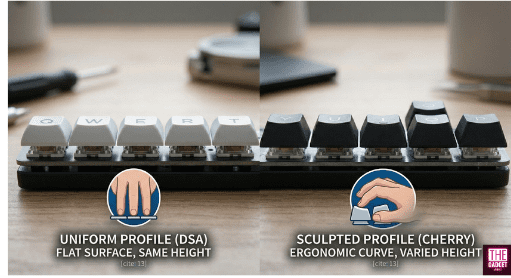
Uniform profiles (such as DSA or XDA) are entirely flat. While aesthetically minimalist, uniform profiles fail to account for the anatomical curvature of human fingers. This geometric oversight forces typists to over-extend to reach top rows, frequently resulting in “finger collision,” where the finger jams awkwardly against the leading edge of the key below it. Prioritizing Instagram aesthetics over biomechanical engineering leads to severe typing fatigue.
Stepped Cherry Architecture vs. Uniform Finger Collision
To optimize typing speed, mechanical keyboards deploy sculpted, stepped architectures. The “Cherry” and “OEM” profiles serve as the industry gold standards.
These profiles feature uniquely engineered heights and carefully calculated surface angles for every specific row, creating a concave, cylindrical bowl shape. This stepped architecture provides crucial geometric clearance, allowing fingers to glide seamlessly between rows without collision. Cherry profile is the enthusiast favourite because it sits lower than standard OEM — published figures put the gap anywhere from about 1mm to 2.5mm depending on row and source — which means less vertical finger travel. Most mass-market gaming boards still ship OEM.
Hardware Verification and Diagnostic Tooling
The definitive difference between consumer opinion and elite forensic analysis is the strict reliance on empirical data. Utilizing specialized metrology equipment strips away subjective marketing jargon, exposing the raw latency and structural limits of the peripheral. I explicitly condemn the amateur practice of testing switch weight by balancing stacks of nickels on a keycap; the error bars swallow the result.
Empirical Force Curve Measurement Methodologies
The holy grail of mechanical keyboard science is the Force Curve graph. These visual representations map the exact force required to depress a switch at every microscopic fraction of a millimeter.
Capturing this requires sophisticated hardware. The independent testers whose force curves the community actually trusts — ThereminGoat and Kinetic Labs among them — both run the Imada FSA-MSL-0.4 force-displacement tester, an instrument Imada sells specifically for tests requiring very small movement. Sampling at 2000Hz, it slowly drives a force-meter probe against the switch stem, tracking the counter-force exerted by the internal spring until the switch physically bottoms out. That is what turns the tactile bump and the hysteresis gap into data rather than opinion.
Validating Digital Logic and Polling Integrity
To test the digital integrity of the keyboard’s matrix, engineers rely on specialized diagnostic software that intercepts the raw USB scan codes.
These programs log the millisecond timing of key events, exposing any firmware that artificially throttles input speed. Utilities in this class — the long-serving Switch Hitter among them, though it is no longer actively maintained — timestamp presses closely enough to catch worn-out switches registering double-taps (chatter) long before the user realizes the switch leaf is dying.
The Definitive Verdict
Typing on a cheap membrane keyboard is a biomechanical hazard disguised as a budget-friendly peripheral.
When settling the final mechanical keyboard vs normal keyboard argument, the answer is grounded in published ergonomics research and materials science. Upgrading to a mechanical keyboard isn’t just a luxury for gamers. It is an investment in your daily comfort. The superior PBT plastics, the tunable spring resistance, the configurable debounce behaviour, and the lighter switch make-forces the ergonomics literature actually endorses make the mechanical paradigm the sensible choice for anyone who actually cares about their hands.
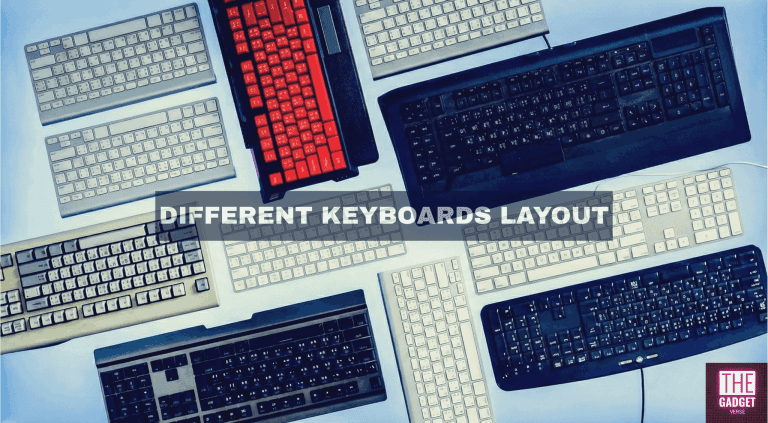
If you are ready to make the switch but don’t know where to start, check out our complete guide on different mechanical keyboard layouts to find the perfect size for your desk and workflow.